<?xml version="1.0" encoding="utf-8"?>
<feed xmlns="http://www.w3.org/2005/Atom">
  <author>
    <name>EngAPI</name>
  </author>
  <generator uri="https://hexo.io/">Hexo</generator>
  <id>https://engapi.com/</id>
  <link href="https://engapi.com/" rel="alternate"/>
  <link href="https://engapi.com/atom.xml" rel="self"/>
  <rights>All rights reserved 2026, EngAPI</rights>
  <subtitle>学习英语路上的辅助网站</subtitle>
  <title>EngAPi-英语接口</title>
  <updated>2026-11-18T05:12:36.000Z</updated>
  <entry>
    <author>
      <name>EngAPI</name>
    </author>
    <category term="koreadermate" scheme="https://engapi.com/ggs/koreadermate/"/>
    <category term="koreader" scheme="https://engapi.com/tags/koreader/"/>
    <category term="koreadermate" scheme="https://engapi.com/tags/koreadermate/"/>
    <content>
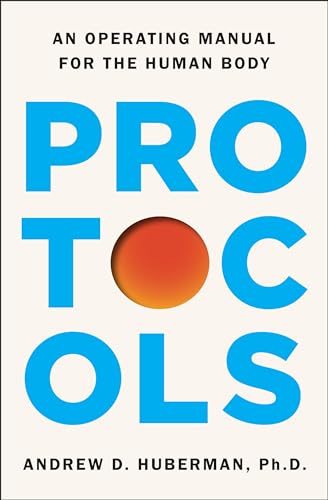
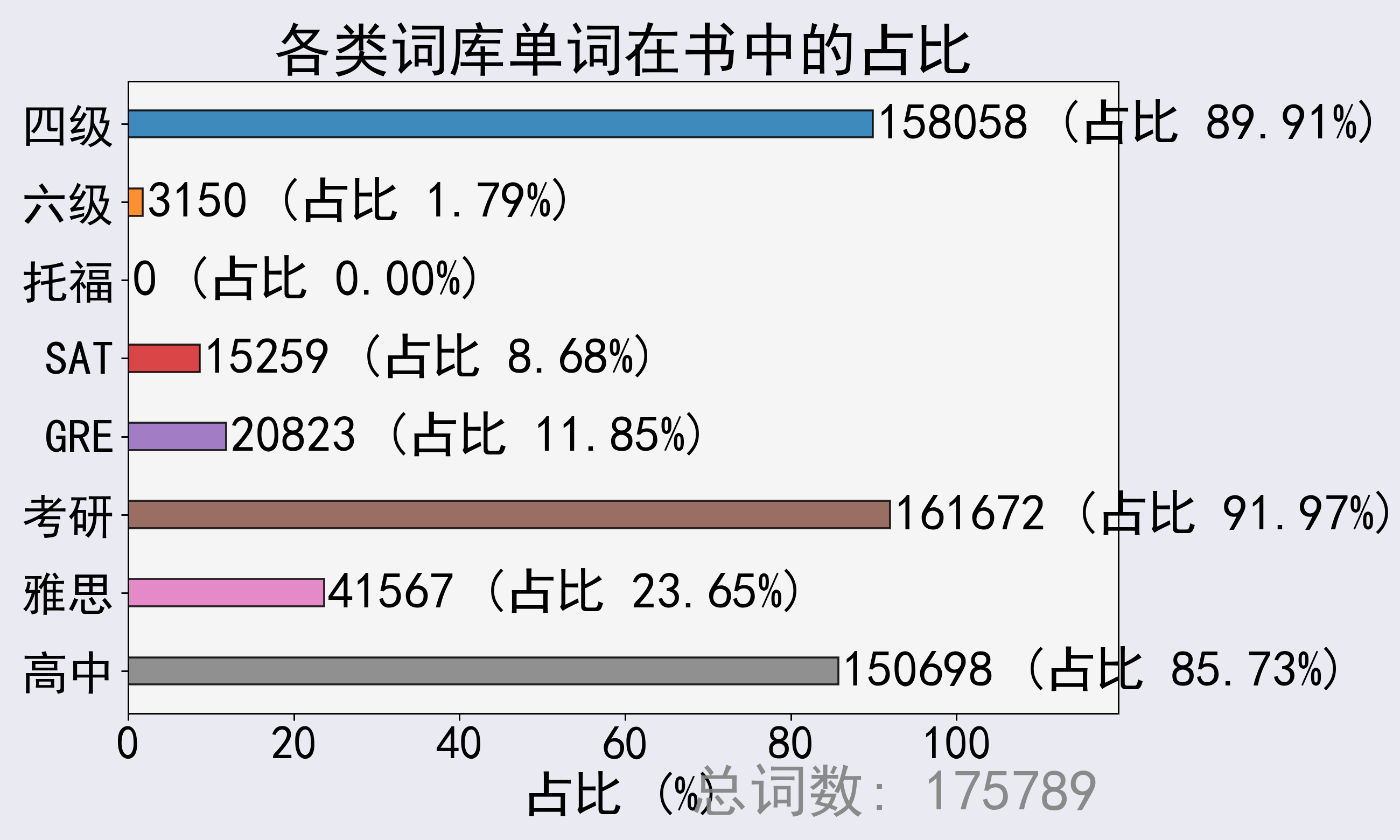
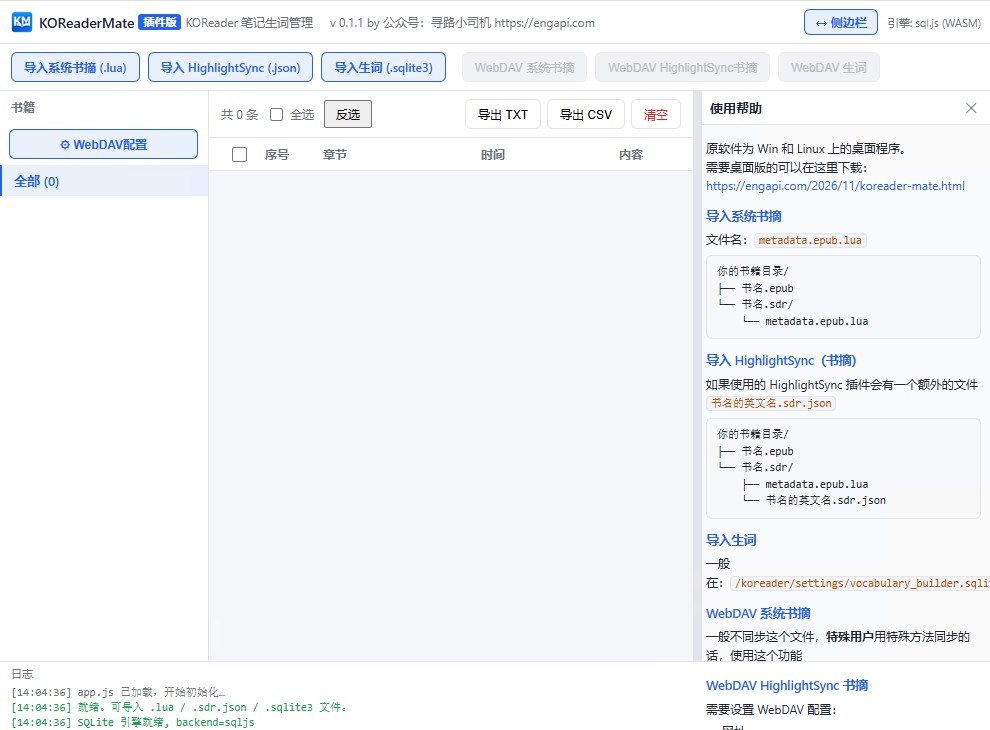
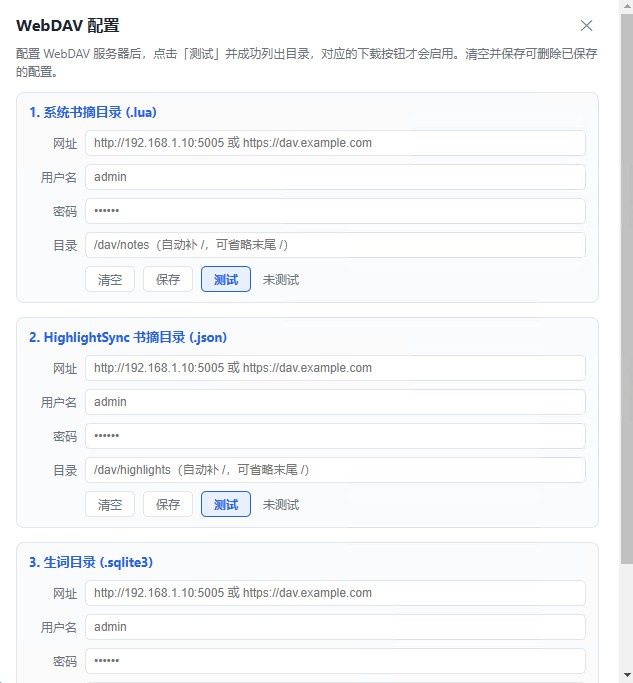
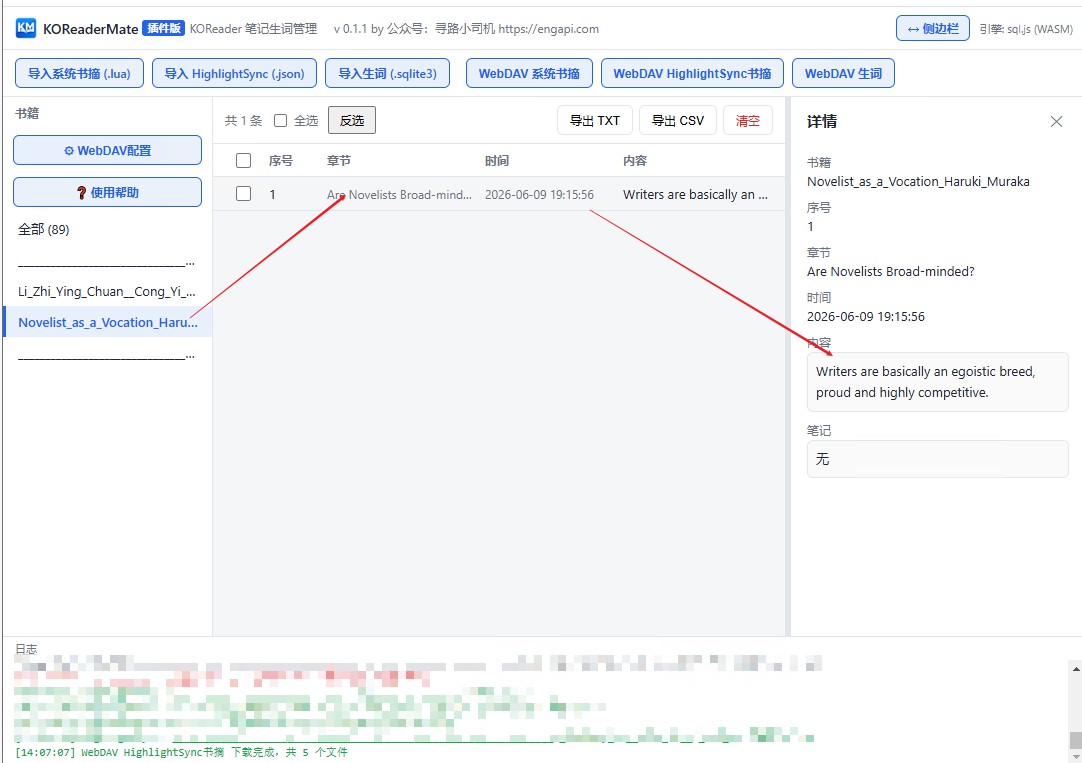
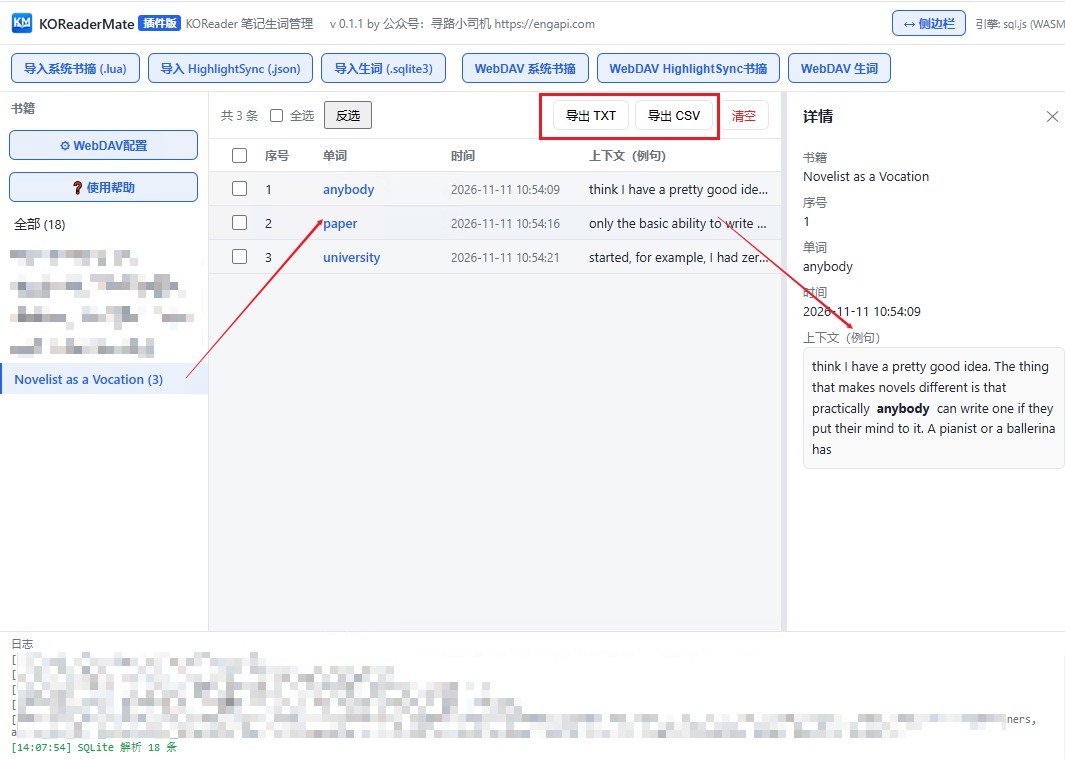
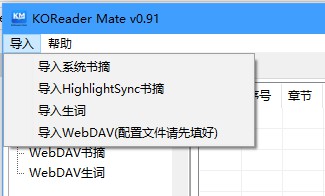
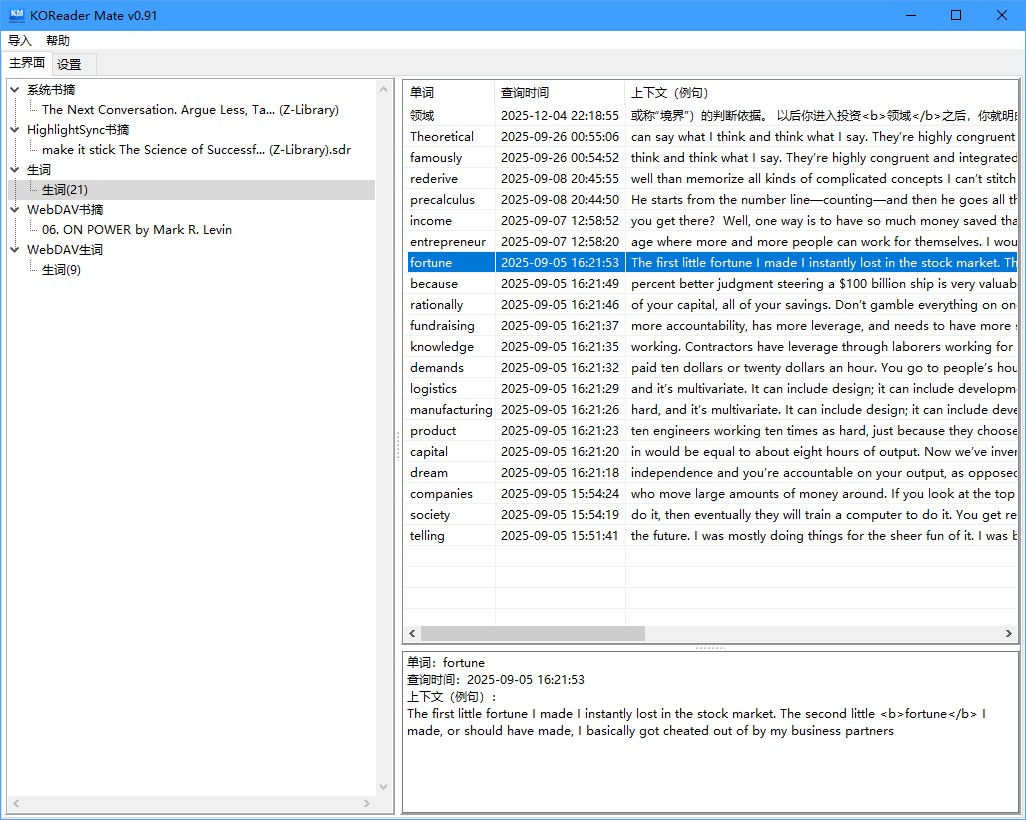
      <![CDATA[<p>KOReader Mate Web为开源软件KOReader辅助导出工具插件版。</p><h2 id="1-软件功能"><a href="#1-软件功能" class="headerlink" title="1.软件功能"></a>1.软件功能</h2><blockquote><p>功能：</p></blockquote><p> 1.导入系统书摘<br> 2.导入HighlightSync书摘<br> 3.导入生词<br> 4.WebDAV系统书摘（一般不用，除非你用特殊方式通过的）<br> 5.WebDAVHighLightSync书摘（可以和KOReader自动同步）<br> 6.WebDAV生词（可以和KOReader自动同步）</p><h2 id="2-软件安装"><a href="#2-软件安装" class="headerlink" title="2.软件安装"></a>2.软件安装</h2><h3 id="下载"><a href="#下载" class="headerlink" title="下载"></a>下载</h3><blockquote><p>Edge 插件市场</p></blockquote><p><a href="https://microsoftedge.microsoft.com/addons/detail/koreader-mate/pfmhhjpgpgeadohpohfnlmmghjcbmfdk">https://microsoftedge.microsoft.com/addons/detail/koreader-mate/pfmhhjpgpgeadohpohfnlmmghjcbmfdk</a></p><blockquote><p>Chrome插件市场</p></blockquote><p><a href="https://chromewebstore.google.com/detail/koreader-mate/lnkipamcpnnhlpfmpgoabehjgbhgkeia">https://chromewebstore.google.com/detail/koreader-mate/lnkipamcpnnhlpfmpgoabehjgbhgkeia</a></p><blockquote><p>直接下载</p></blockquote><p>老网盘：<br> <a href="https://url48.ctfile.com/d/5062648-169485870-513629?p=514467">https://url48.ctfile.com/d/5062648-169485870-513629?p=514467</a></p><p>新网盘：<br> <a href="https://xiaosiji.lanzouw.com/b0o0iyv3g%E5%AF%86%E7%A0%81:5jkg">https://xiaosiji.lanzouw.com/b0o0iyv3g密码:5jkg</a></p><h3 id="安装"><a href="#安装" class="headerlink" title="安装"></a>安装</h3><p>Edge 插件市场和 Chrome 插件市场安装就不讲解了</p><blockquote><p>离线安装方式讲解</p></blockquote><p>1.解压到某个目录</p><p>2.打开开发人员模式</p><p><img src="/img/kaifarenyuan.png" alt="开发人员"></p><p>3.加载扩展打开前面解压到的目录</p><p><img src="/img/jiazaikuozhan.png" alt="image-20261118140045399"></p><h2 id="3-界面展示（版本号请忽略，截图比较早）"><a href="#3-界面展示（版本号请忽略，截图比较早）" class="headerlink" title="3.界面展示（版本号请忽略，截图比较早）"></a>3.界面展示（版本号请忽略，截图比较早）</h2><h3 id="主界面"><a href="#主界面" class="headerlink" title="主界面"></a>主界面</h3><h2 id=""><a href="#" class="headerlink" title=""></a><img src="/img/koreadermateweb-01.jpg" alt="koreadermateweb-01"></h2><h3 id="配置WebDAV"><a href="#配置WebDAV" class="headerlink" title="配置WebDAV"></a>配置WebDAV</h3><p><img src="/img/koreadermateweb-02.jpg" alt="koreadermateweb-02"></p><h3 id="WebDAV-HighlightSync书摘"><a href="#WebDAV-HighlightSync书摘" class="headerlink" title="WebDAV HighlightSync书摘"></a>WebDAV HighlightSync书摘</h3><p><img src="/img/koreadermateweb-03.jpg" alt="koreadermateweb-03"></p><h3 id="WebDAV-生词"><a href="#WebDAV-生词" class="headerlink" title="WebDAV 生词"></a>WebDAV 生词</h3><p><img src="/img/koreadermateweb-04.jpg" alt="koreadermateweb-04"></p>]]>
    </content>
    <id>https://engapi.com/2026/11/koreader-mate-web.html</id>
    <link href="https://engapi.com/2026/11/koreader-mate-web.html"/>
    <published>2026-11-18T05:12:36.000Z</published>
    <summary>
      <![CDATA[<p>KOReader Mate Web为开源软件KOReader辅助导出工具插件版。</p>
<h2 id="1-软件功能"><a href="#1-软件功能" class="headerlink"]]>
    </summary>
    <title>KOReader Mate Web为开源软件KOReader辅助导出工具插件版</title>
    <updated>2026-11-18T05:12:36.000Z</updated>
  </entry>
  <entry>
    <author>
      <name>EngAPI</name>
    </author>
    <category term="koreadermate" scheme="https://engapi.com/ggs/koreadermate/"/>
    <category term="koreader" scheme="https://engapi.com/tags/koreader/"/>
    <category term="koreadermate" scheme="https://engapi.com/tags/koreadermate/"/>
    <content>
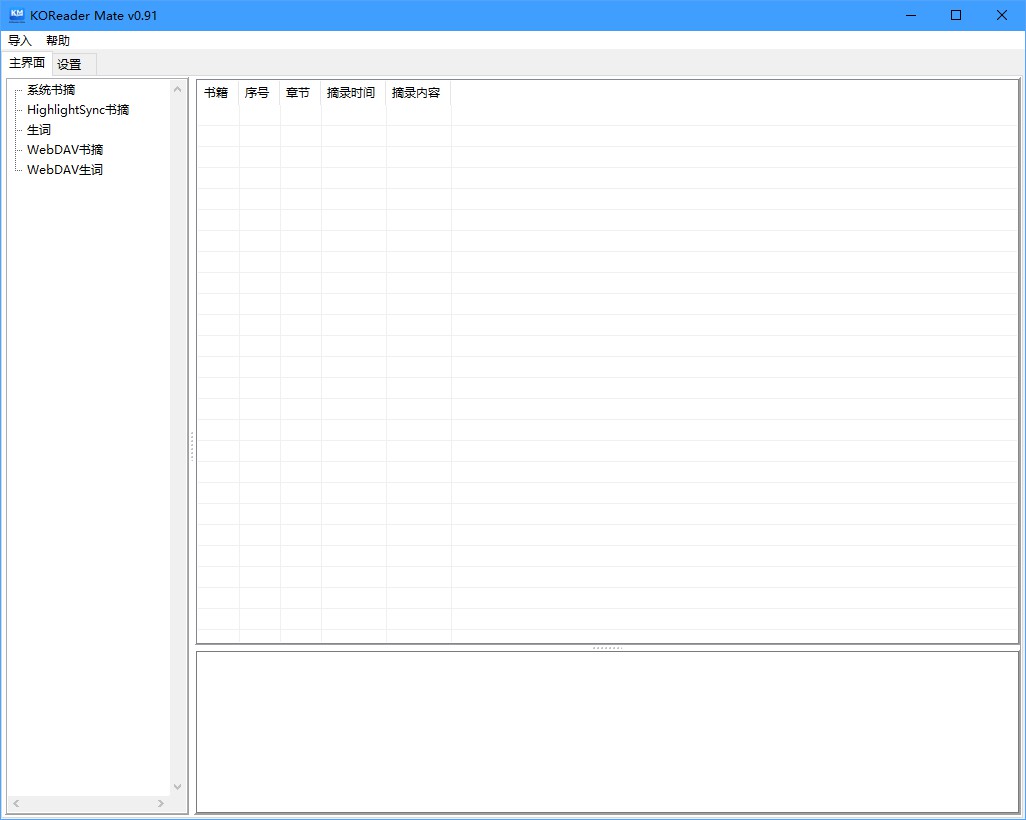
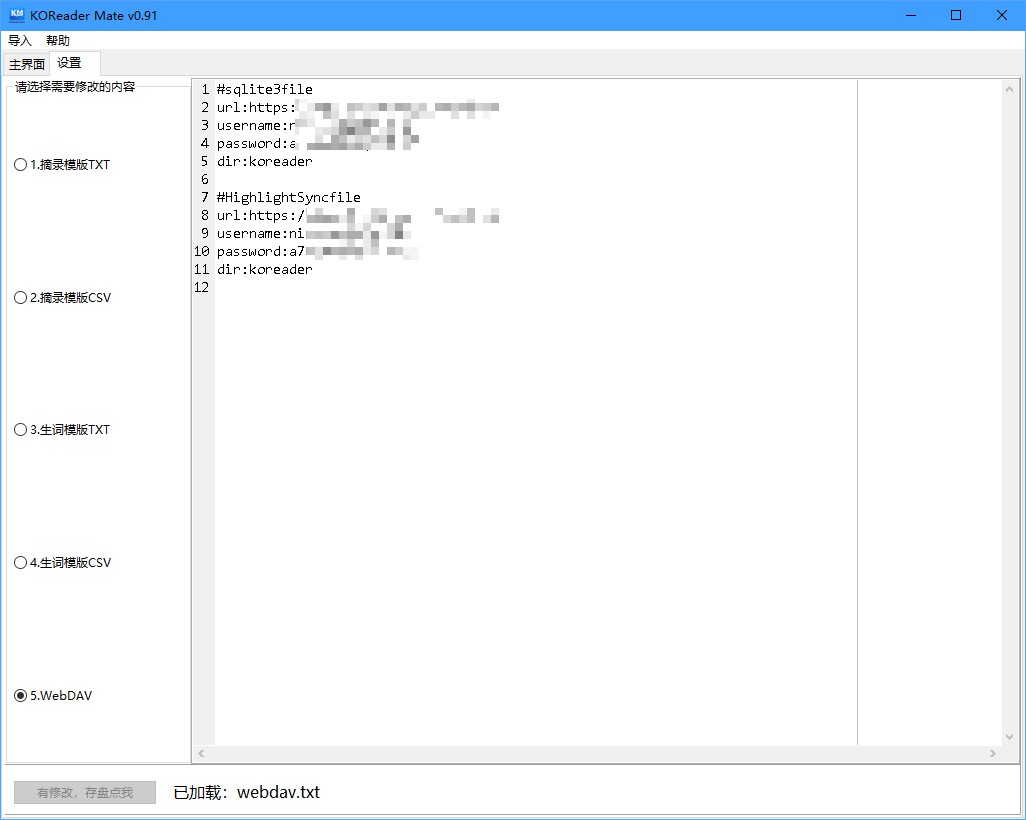
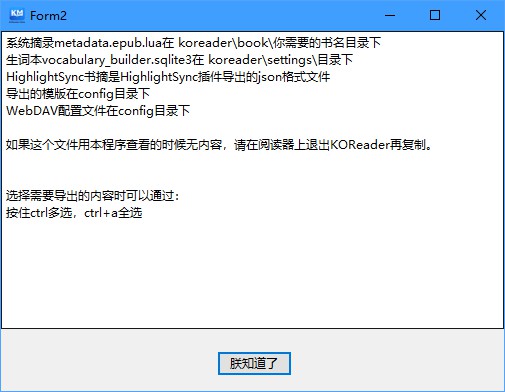
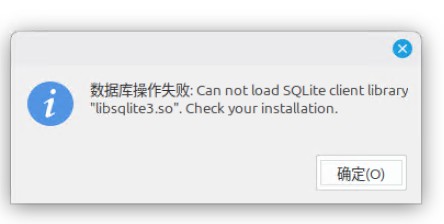
      <![CDATA[<p>KOReader Mate为开源软件KOReader辅助导出工具</p><h2 id="软件功能"><a href="#软件功能" class="headerlink" title="软件功能"></a>软件功能</h2><blockquote><p>功能：</p></blockquote><p> 1.导入系统书摘<br> 2.导入HighlightSync书摘<br> 3.导入生词<br> 4.WebDAV书摘（可以和KOReader自动同步）<br> 5.WebDAV生词（可以和KOReader自动同步）</p><h2 id="软件下载"><a href="#软件下载" class="headerlink" title="软件下载"></a>软件下载</h2><p><a href="https://github.com/myEngAPI/KOReaderMate">https://github.com/myEngAPI/KOReaderMate</a></p><p>或者</p><p><a href="https://xiaosiji.lanzouw.com/b0nzsd9dc">https://xiaosiji.lanzouw.com/b0nzsd9dc</a> 密码:2qw7</p><h2 id="版本更新历史"><a href="#版本更新历史" class="headerlink" title="版本更新历史"></a>版本更新历史</h2><blockquote><p>版本更新历史</p></blockquote><p>v0.96<br>  增加了生词的排序<br>  改为多线程，导入时不假死</p><p>v0.95</p><p>  生词本按书籍名区分</p><p>v0.91<br>  修复了几个bug<br>v0.9:<br>  增加WebDAV远程摘录和生词本功能<br>v0.5:<br>  增加HighlightSync格式导入功能<br>  增加导出模版功能</p><h2 id="视频演示"><a href="#视频演示" class="headerlink" title="视频演示"></a>视频演示</h2><div class="bili-embed" style="position:relative;width:100%;padding-bottom:56.25%;height:0;overflow:hidden;margin:1.2rem 0;border-radius:10px;background:#000;"><iframe src="https://player.bilibili.com/player.html?bvid=BV1JYk5BLEwB&page=1&high_quality=1&danmaku=0&autoplay=0" style="position:absolute;top:0;left:0;width:100%;height:100%;border:0;" scrolling="no" frameborder="0" allowfullscreen="true" loading="lazy"></iframe></div><h2 id="界面展示（版本号请忽略，截图比较早）"><a href="#界面展示（版本号请忽略，截图比较早）" class="headerlink" title="界面展示（版本号请忽略，截图比较早）"></a>界面展示（版本号请忽略，截图比较早）</h2><p><img src="/img/KOReaderMate-screen1.jpg" alt="KOReaderMate-screen1"></p><p><img src="/img/KOReaderMate-screen2.jpg" alt="KOReaderMate-screen2"></p><p><img src="/img/KOReaderMate-screen3.jpg" alt="KOReaderMate-screen3"></p><p><img src="/img/KOReaderMate-screen4.jpg" alt="KOReaderMate-screen4"></p><p><img src="/img/KOReaderMate-screen5.jpg" alt="KOReaderMate-screen5"></p><h2 id="使用说明"><a href="#使用说明" class="headerlink" title="使用说明"></a>使用说明</h2><p><img src="/img/KOReaderMate-screen6.jpg" alt="KOReaderMate-screen6"></p><h2 id="Linux版本说明"><a href="#Linux版本说明" class="headerlink" title="Linux版本说明"></a>Linux版本说明</h2><blockquote><p> 需要安装的包</p></blockquote><p>linux下可能需要这些包<br>libsqlite3-dev<br>libssl3<br>ca-certificates<br>libssl-dev</p><blockquote><p>Linux下可能的报错提示</p></blockquote><p><img src="/img/koreadermate-error1.jpg" alt="koreadermate-error1"></p><h2 id="MacOS"><a href="#MacOS" class="headerlink" title="MacOS"></a>MacOS</h2><p>等小司机买Mac电脑了再开发，Lazarus开发，原生跨平台。</p><blockquote><p>20261118</p></blockquote><p><strong>已开发浏览器插件版</strong>，请在Edge或者Chrome 插件市场搜索 KOReader Mate</p>]]>
    </content>
    <id>https://engapi.com/2026/11/koreader-mate.html</id>
    <link href="https://engapi.com/2026/11/koreader-mate.html"/>
    <published>2026-11-03T06:49:27.000Z</published>
    <summary>
      <![CDATA[<p>KOReader Mate为开源软件KOReader辅助导出工具</p>
<h2 id="软件功能"><a href="#软件功能" class="headerlink"]]>
    </summary>
    <title>KOReader Mate为开源软件KOReader开发辅助导出工具</title>
    <updated>2026-11-03T06:49:27.000Z</updated>
  </entry>
  <entry>
    <author>
      <name>EngAPI</name>
    </author>
    <category term="浏览器" scheme="https://engapi.com/ggs/%E6%B5%8F%E8%A7%88%E5%99%A8/"/>
    <category term="浏览器插件" scheme="https://engapi.com/tags/%E6%B5%8F%E8%A7%88%E5%99%A8%E6%8F%92%E4%BB%B6/"/>
    <category term="anki" scheme="https://engapi.com/tags/anki/"/>
    <content>
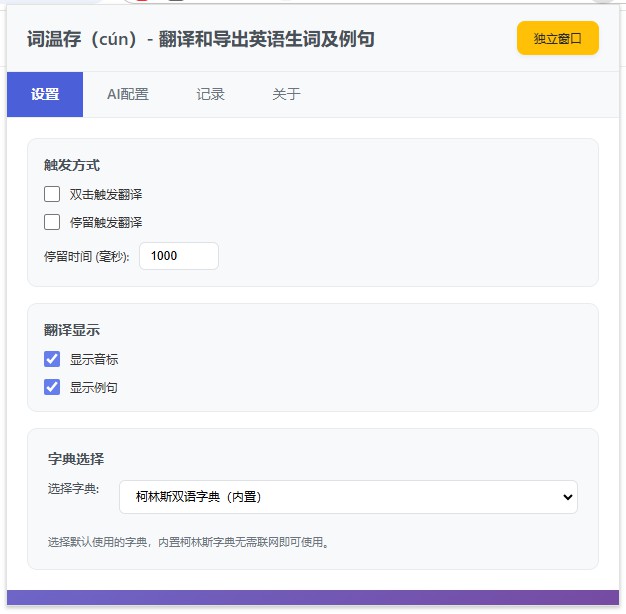
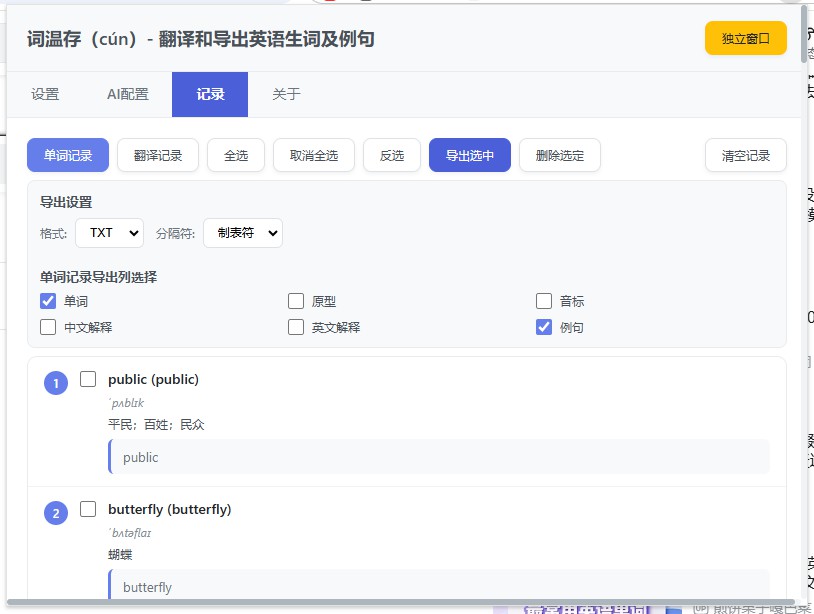
      <![CDATA[<h2 id="介绍"><a href="#介绍" class="headerlink" title="介绍"></a>介绍</h2><p>词温存（cún）- 翻译和导出英语生词及例句</p><p>一款用于保存单词和句子并翻译单词的扩展，可以导出为anki格式用于学习英语</p><p>An extension for saving words and sentences and translating words, which can be exported to Anki format for learning English.</p><p>致力于在你学习英语的道路上给与辅助。</p><p>支持双击和悬停触发翻译，本地字典查询，单词历史记录管理等功能</p><p>选中句子后右键可以用AI大模型翻译</p><h2 id="更新记录（可能不同步，见软件说明页）"><a href="#更新记录（可能不同步，见软件说明页）" class="headerlink" title="更新记录（可能不同步，见软件说明页）"></a>更新记录（可能不同步，见软件说明页）</h2><p>0.80 新增功能：</p><ol><li><p>新增AI翻译及翻译记录导出功能</p></li><li><p>新增AI配置</p></li></ol><p>0.60 新增功能：</p><ol><li>新增剑桥在线词典</li><li>新增发音功能</li></ol><h2 id="不同浏览器下载页面，也可以直接在扩展市场里搜"><a href="#不同浏览器下载页面，也可以直接在扩展市场里搜" class="headerlink" title="不同浏览器下载页面，也可以直接在扩展市场里搜"></a>不同浏览器下载页面，也可以直接在扩展市场里搜</h2><p>google chrome</p><p><a href="https://chromewebstore.google.com/detail/fkdljnchhbkmogddpfcelhmjiopkneej">https://chromewebstore.google.com/detail/fkdljnchhbkmogddpfcelhmjiopkneej</a><br>Firefox</p><p><a href="https://addons.mozilla.org/zh-CN/firefox/addon/%E8%AF%8D%E6%B8%A9%E5%AD%98-wordsaver/">https://addons.mozilla.org/zh-CN/firefox/addon/%E8%AF%8D%E6%B8%A9%E5%AD%98-wordsaver/</a><br>Edge</p><p><a href="https://microsoftedge.microsoft.com/addons/detail/ncmgjjpnlmcldiobdpmnefnbphjkbike">https://microsoftedge.microsoft.com/addons/detail/ncmgjjpnlmcldiobdpmnefnbphjkbike</a></p><h2 id="软件界面截图"><a href="#软件界面截图" class="headerlink" title="软件界面截图"></a>软件界面截图</h2><p><img src="/img/cun-logo.png" alt="cun-logo"></p><p><img src="/img/browser-extension-to-anki.jpg" alt="browser-extension-to-anki"></p><p><img src="/img/export-to.jpg" alt="export-to"></p><h2 id="Bilibili视频演示"><a href="#Bilibili视频演示" class="headerlink" title="Bilibili视频演示"></a>Bilibili视频演示</h2><div class="bili-embed" style="position:relative;width:100%;padding-bottom:56.25%;height:0;overflow:hidden;margin:1.2rem 0;border-radius:10px;background:#000;"><iframe src="https://player.bilibili.com/player.html?bvid=BV1i4roBxEVE&page=1&high_quality=1&danmaku=0&autoplay=0" style="position:absolute;top:0;left:0;width:100%;height:100%;border:0;" scrolling="no" frameborder="0" allowfullscreen="true" loading="lazy"></iframe></div>]]>
    </content>
    <id>https://engapi.com/2026/10/browser-chrome-firefox-edge-extension-to-anki.html</id>
    <link href="https://engapi.com/2026/10/browser-chrome-firefox-edge-extension-to-anki.html"/>
    <published>2026-10-28T02:18:32.000Z</published>
    <summary>词温存（cún）- 翻译和导出英语生词及例句（上下文）-Chrome，Edge，Firefox记录的生词导出到Anki或纯文本</summary>
    <title>词温存（cún）- 翻译和导出英语生词及例句（上下文）-Chrome，Edge，Firefox记录的生词导出到Anki或纯文本</title>
    <updated>2026-10-28T02:18:32.000Z</updated>
  </entry>
  <entry>
    <author>
      <name>EngAPI</name>
    </author>
    <category term="koreader" scheme="https://engapi.com/ggs/koreader/"/>
    <category term="koreader" scheme="https://engapi.com/tags/koreader/"/>
    <category term="kindle" scheme="https://engapi.com/tags/kindle/"/>
    <content>
      <![CDATA[<h2 id="缘起"><a href="#缘起" class="headerlink" title="缘起"></a>缘起</h2><p>KOReader是我用过最合心意的阅读软件之一，能导出生词和上下文（所在句子）。</p><p>但KOReader在国内有个使用问题是<strong>不能翻译</strong>（因为用了谷歌翻译），我搜索了下除了host修改外没找到其他解决方案。</p><p>用AI写了个插件“小司机翻译配置”，可以把翻译修改为DeepL或者DeepSeek和通用接口，可以选<strong>免费的</strong>硅基流动。</p><h2 id="代码和下载地址📥"><a href="#代码和下载地址📥" class="headerlink" title="代码和下载地址📥"></a>代码和下载地址📥</h2><blockquote><p>开源代码：<a href="https://github.com/myEngAPI/KOReader-TranslatorChanger">https://github.com/myEngAPI/KOReader-TranslatorChanger</a></p></blockquote><h2 id="视频演示地址📺"><a href="#视频演示地址📺" class="headerlink" title="视频演示地址📺"></a>视频演示地址📺</h2><blockquote><p>视频演示：</p></blockquote><p><a href="https://www.bilibili.com/video/BV138zQBwEXh/">https://www.bilibili.com/video/BV138zQBwEXh/</a><br><a href="https://www.bilibili.com/video/BV1Ja6wB6EnC/">https://www.bilibili.com/video/BV1Ja6wB6EnC/</a></p><h2 id="硅基流动免费模型🆓"><a href="#硅基流动免费模型🆓" class="headerlink" title="硅基流动免费模型🆓"></a>硅基流动免费模型🆓</h2><blockquote><p>这里可以看哪些模型免费（下面视频有说怎么选）</p></blockquote><p><a href="https://cloud.siliconflow.cn/me/models">https://cloud.siliconflow.cn/me/models</a></p><h2 id="界面展示"><a href="#界面展示" class="headerlink" title="界面展示"></a>界面展示</h2><p><img src="/img/koreader-translatorchanger.png" alt="koreader-translatorchanger"></p><h2 id="后记"><a href="#后记" class="headerlink" title="后记"></a>后记</h2><p>尝试了百度翻译，搞不定签名返回的md5加密，放弃。</p><p>平时用的最多的有道词典，没有每月免费额度，价格不如DeepSeek实惠。</p><h2 id="目前测试无问题设备"><a href="#目前测试无问题设备" class="headerlink" title="目前测试无问题设备"></a>目前测试无问题设备</h2><p>✅miui（android）</p><p>✅雷电模拟器</p><p>✅KPW3</p><p>✅KPW6</p><h2 id="视频演示📺"><a href="#视频演示📺" class="headerlink" title="视频演示📺"></a>视频演示📺</h2><blockquote><p>这里是演示视频</p></blockquote><div class="bili-embed" style="position:relative;width:100%;padding-bottom:56.25%;height:0;overflow:hidden;margin:1.2rem 0;border-radius:10px;background:#000;"><iframe src="https://player.bilibili.com/player.html?bvid=BV1Ja6wB6EnC&page=1&high_quality=1&danmaku=0&autoplay=0" style="position:absolute;top:0;left:0;width:100%;height:100%;border:0;" scrolling="no" frameborder="0" allowfullscreen="true" loading="lazy"></iframe></div>]]>
    </content>
    <id>https://engapi.com/2026/10/kindle-koreader-translatorchanger.html</id>
    <link href="https://engapi.com/2026/10/kindle-koreader-translatorchanger.html"/>
    <published>2026-10-24T07:43:35.000Z</published>
    <summary>
      <![CDATA[<h2 id="缘起"><a href="#缘起" class="headerlink"]]>
    </summary>
    <title>KOReader翻译设置更新了，国内可用免费大模型翻译，OpenAI，硅基流动</title>
    <updated>2026-10-24T07:43:35.000Z</updated>
  </entry>
  <entry>
    <author>
      <name>EngAPI</name>
    </author>
    <category term="经济学人" scheme="https://engapi.com/ggs/%E7%BB%8F%E6%B5%8E%E5%AD%A6%E4%BA%BA/"/>
    <category term="经济学人" scheme="https://engapi.com/tags/%E7%BB%8F%E6%B5%8E%E5%AD%A6%E4%BA%BA/"/>
    <content>
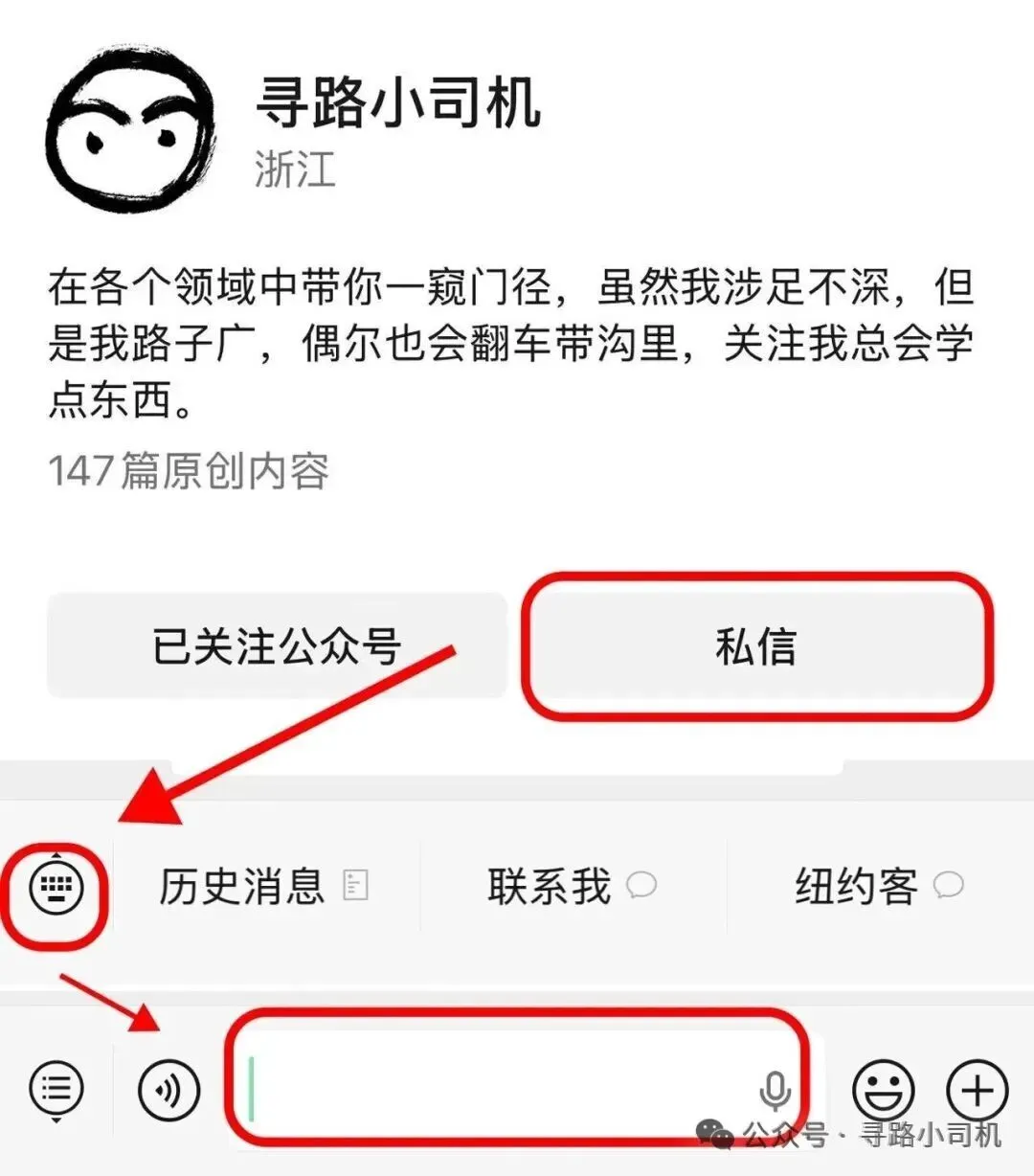
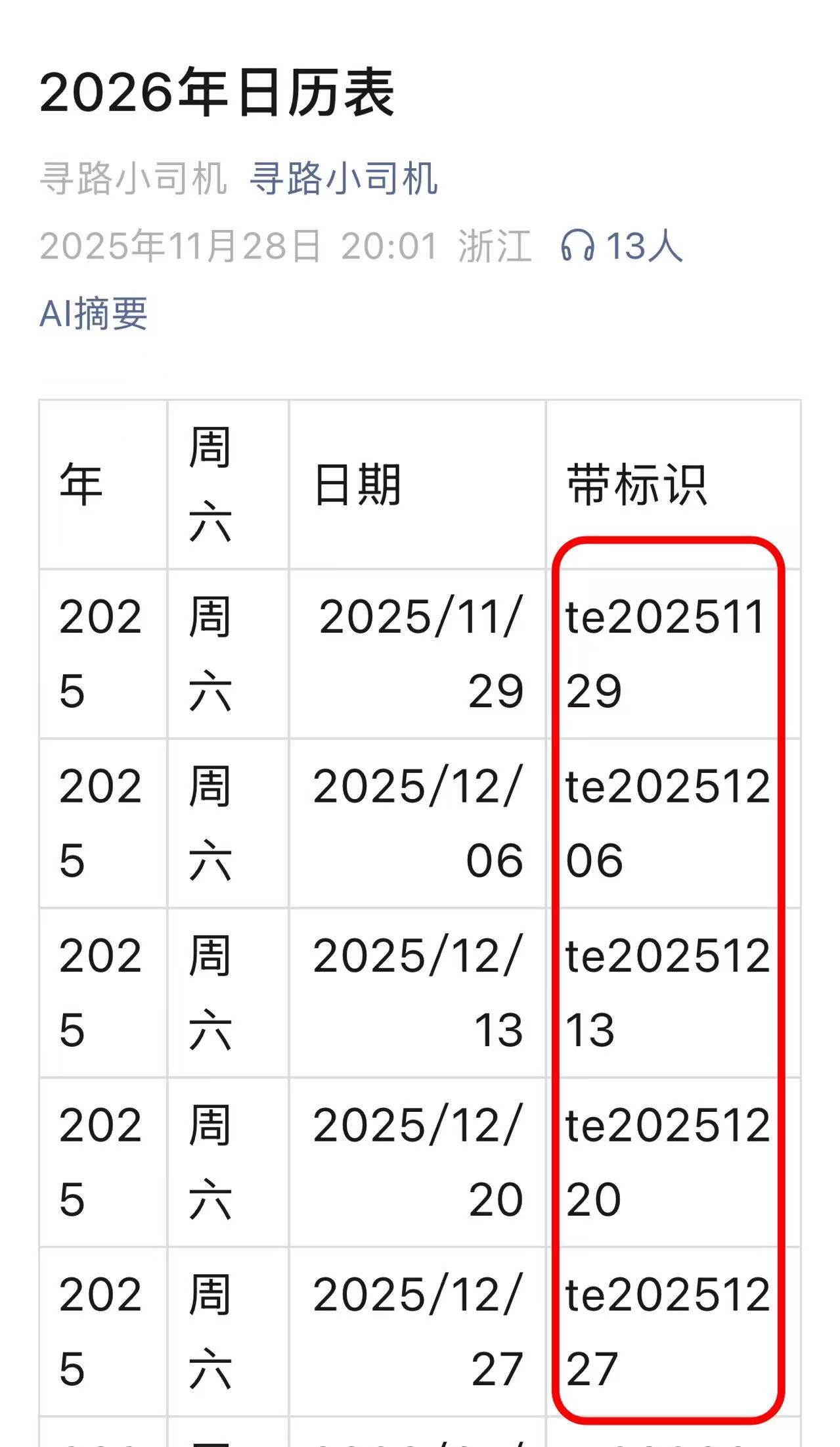
      <![CDATA[<h2 id="怎么获取经济学人"><a href="#怎么获取经济学人" class="headerlink" title="怎么获取经济学人"></a>怎么获取经济学人</h2><blockquote><p>首先关注公众号 </p></blockquote><p><img src="/img/qrcode_for_gh_dc967cd12a88_258.jpg" alt="经济学人公众号"></p><blockquote><p>然后</p></blockquote><p><img src="/img/640.webp" alt="公众号私信"></p><blockquote><p>输入“<strong>日历</strong>”或者其他任何关键字，就会出来一个网页。</p></blockquote><blockquote><p>网页里有</p></blockquote><p><img src="/img/replypic.jpg" alt="回复图片"></p><blockquote><p>再在公众号里回复你需要的<strong>te</strong>开头的字符串就能获取下载链接了。</p></blockquote>]]>
    </content>
    <id>https://engapi.com/2026/10/how-to-get-the-economist.html</id>
    <link href="https://engapi.com/2026/10/how-to-get-the-economist.html"/>
    <published>2026-10-24T02:38:50.000Z</published>
    <summary>怎么获取经济学人 The Economist</summary>
    <title>怎么获取经济学人 The Economist</title>
    <updated>2026-10-24T02:38:50.000Z</updated>
  </entry>
  <entry>
    <author>
      <name>EngAPI</name>
    </author>
    <category term="书籍" scheme="https://engapi.com/ggs/%E4%B9%A6%E7%B1%8D/"/>
    <category term="书籍推荐" scheme="https://engapi.com/tags/%E4%B9%A6%E7%B1%8D%E6%8E%A8%E8%8D%90/"/>
    <content>
      <![CDATA[<blockquote><p>此书为范例，平日就在公众号中分享</p></blockquote><p>Protocols: An Operating Manual for the Human Body<br>作者：Andrew D. Huberman</p><p><img src="/img/AndrewDHubermanProtocols_cover.jpg" alt="AndrewDHubermanProtocols_cover"></p><p>Goodreads 评分：4.15</p><p>评分人数：287</p><p>关注公众号【<strong>寻路小司机</strong>】</p><p>在公众号消息中回复“<strong>book01</strong>”获取下载链接。</p><p><img src="/img/qrcode_for_gh_dc967cd12a88_258.jpg" alt="qrcode_for_gh_dc967cd12a88_258"></p><p>英文简介</p><p>Dr Andrew Huberman, host of the world’s leading health podcast, Huberman Lab, and neuroscientist and tenured professor at Stanford School of Medicine, introduces Protocols, an essential guide to improving brain function, enhancing mood and energy, optimising bodily health and physical performance, and rewiring your nervous system to learn new skills and behaviours that can transform your life.</p><p>Protocols provides simple, powerful and evidence-based solutions to life’s most common challenges. Designed to improve your mental health, physical health and performance, these guidelines are customisable, allowing you to adapt them to your specific needs. With his clear and engaging style, Dr Huberman explains the scientific principles behind each protocol and how they can deliver immediate, effective results. Protocols is your essential road map for achieving optimal health.</p><p>简介中文翻译<br>安德鲁・胡伯曼博士，世界顶尖健康播客《胡伯曼实验室》的主持人，斯坦福医学院神经科学家、终身教授。他在《人体使用指南》（Protocols）这本书中，提供了一份必备指南：改善大脑功能、提升情绪与精力、优化身体健康与体能表现，重塑神经系统，习得新技能与行为模式，从而改变你的人生。</p><p>《人体使用指南》针对生活里最常见的难题，给出简单、高效、有科研依据的解决方案。这套准则旨在改善你的心理健康、身体健康与综合表现，并且支持个性化调整，适配你的自身需求。胡伯曼博士文风清晰易懂、富有吸引力，讲解每一套方案背后的科学原理，以及如何快速取得实效。《人体使用指南》是帮你实现最佳健康状态的必备路线图。</p><p>单词统计及占比<br>总词数：175789</p><p><img src="/img/AndrewDHubermanProtocols_word_stats_chart.png" alt="AndrewDHubermanProtocols_word_stats_chart"></p><p>四级：158058（占比 89.91%）<br>六级：3150（占比 1.79%）<br>托福：0（占比 0.00%）<br>SAT：15259（占比 8.68%）<br>GRE：20823（占比 11.85%）<br>考研：161672（占比 91.97%）<br>雅思：41567（占比 23.65%）<br>高中：150698（占比 85.73%）</p><p>阅读参考（小司机经验）：<br>四级词汇占比 93% 左右，适合词汇量 6000–8000 读者；<br>四级词汇占比 92% 左右，适合词汇量 10000–12000 读者。</p><p>本书可能比较多医学词汇。</p>]]>
    </content>
    <id>https://engapi.com/2026/10/AndrewDHubermanProtocols.html</id>
    <link href="https://engapi.com/2026/10/AndrewDHubermanProtocols.html"/>
    <published>2026-10-23T12:55:29.000Z</published>
    <summary>
      <![CDATA[<blockquote>
<p>此书为范例，平日就在公众号中分享</p>
</blockquote>
<p>Protocols: An Operating Manual for the Human Body<br>作者：Andrew D.]]>
    </summary>
    <title>外国版《人体使用手册》Protocols  An Operating Manual for the Human Body</title>
    <updated>2026-10-23T12:55:29.000Z</updated>
  </entry>
  <entry>
    <author>
      <name>EngAPI</name>
    </author>
    <category term="随笔" scheme="https://engapi.com/ggs/%E9%9A%8F%E7%AC%94/"/>
    <content>
      <![CDATA[<h2 id="说明"><a href="#说明" class="headerlink" title="说明"></a>说明</h2><p>EngAPi原托管在服务器上，2026年10月的PHP BUG来袭，修复耗费精力，遂改到Github Pages上。</p><p>EngAPi.com域名指向Github Pages，Github Pages关门可能性很小，有利于文档长期保留。</p><p>若有天 <a href="https://engapi.com/">https://engapi.com</a> 出意外，可以用 <a href="https://myengapi.github.io/">https://myengapi.github.io/</a> 访问，一套人马，两块牌子。</p><p>如果访问这2个网站有些慢，可以试试 <a href="https://engapi.pages.dev/">https://engapi.pages.dev/</a>  Cloudflare提供的同步网站。</p><p>如果上述网站访问都很慢</p><p>可以使用</p><p><a href="https://blog.engapi.com/">https://blog.engapi.com</a></p><p>这些服务器都不在一个地方，不同的区域访问速度可能会不同，请按需收藏。</p><p>–小司机</p><p><img src="/img/engapi.jpg" alt="engapi"></p>]]>
    </content>
    <id>https://engapi.com/2026/10/first.html</id>
    <link href="https://engapi.com/2026/10/first.html"/>
    <published>2026-10-23T06:51:19.000Z</published>
    <summary>engapi.com转github pages的考虑</summary>
    <title>engapi.com转github pages的考虑</title>
    <updated>2026-10-23T06:51:19.000Z</updated>
  </entry>
</feed>